
Hashcatalyst: Automating password cracking.
Let’s set the scene… You’re mid-way through an internal infrastructure assessment. One half of you is wondering why the client’s SOC hadn’t sufficiently detected your pass-the-hash attacks and the other half doesn’t care because you’ve leveraged a misconfigured AD CS certificate to get domain admin. After DCSync’ing your way to a few thousand juicy NT hashes that are begging to be cracked, you upload them to the company rig and kick off an initial hashcat run before heading home.
Later, you take a quick break from your latest Netflix binge to check the progress and find it’ll exhaust in 2 hours, but you’re exhausted yourself and want to go to bed. You could leave it running overnight, but what about all that wasted time after it finishes?
No time to waste
A few months ago Will Hunt released Hashcatalyst, a hashcat wrapper that removes wasted time by chaining multiple attacks together as well as enhancing wordlist generation. We’re not going to explain every type of attack Hashcatalyst offers as we’ve written guides on how to carry out most of these attacks manually and how to chain attacks is detailed on the above GitHub. So we’re going to focus on understanding some of other attacks and features of the tool, as well as digging into augmenting wordlist generation.
Combinator
Hashcatalyst offers the below flavours of combinator attack:
12. Combinator
13. Combinator + rules /w loopback
Combinator attacks (attack mode -a1) simply combine every candidate in one dictionary with every candidate in a second dictionary, creating two-element passphrase guesses (e.g. the passphrase 123456password consists of two elements, “123456” and “password”).
We’ll use the Linux version of Hashcatalyst for the below examples. If we just look at the part of the option 12 command relevant to our combinator attack, we will see
-a1 $combi_list1 $combi_list2where -a1 specifies combinator mode and then the paths defined at the top of the script in $combi_list1 and $combi_list2 will be inserted. Simple.
Now it gets a little more fun. When running -a1 you’re only able to apply a single rule to the left/right dictionary using the -j / -k switches and are unable to use -r / –rules to add traditional rulesets.
Option 13 works around this by piping pre-combined candidates to hashcat which can then apply rules as normal as it’s now outside of the -a1 restriction. Here’s what Hashcatalyst is doing, again excluding some parts that aren’t relevant to the attack.
./hashcat -a1 $combi_list1 $combi_list2 --stdout | ./hashcat -m$hashcat_mode $hash_list -r $combi_ruleBefore the pipe, hashcat is being as a candidate generator only, where we’re taking our two defined dictionaries in -a1 mode and using –stdout to send the resulting candidates to stdout. This is then piped into the second instance of hashcat via stdin where we’re now in familiar hashcat territory and can apply whatever rule file we like as defined in $combi_rule, as if we were using a standard -a0 dictionary attack.
Random rule generation
Running our tried and tested rules is great but sometimes it’s worth letting hashcat create some random rules for us. This is particularly useful when you’re running out of ideas and need to start running non-deterministic attacks just to see if you get lucky. Enter options 14 and 15.
14. Wordlist + 250,000 random rules /w loopback
15. All wordlists + 250,000 random rules /w loopback
These two options will either run a single defined $wordlist or every wordlist (file with .txt extension) in the specified $wordlist_dir with 250,000 random rules. The relevant code in Hashcatalyst is
$wordlist -g 250000 --loopbackthe number of which can of course be changed to suit your needs. For fast hashes you could comfortably exceed this number.
By this point I should have mentioned that the –loopback switch is, simply put, a gift from the gods. When hashcat exhausts after finishing a session using rules, loopback will then restart hashcat again, running your founds from that session through the ruleset a second time which will of course generate new candidates. This will continue to loop indefinitely until there are no more new founds.
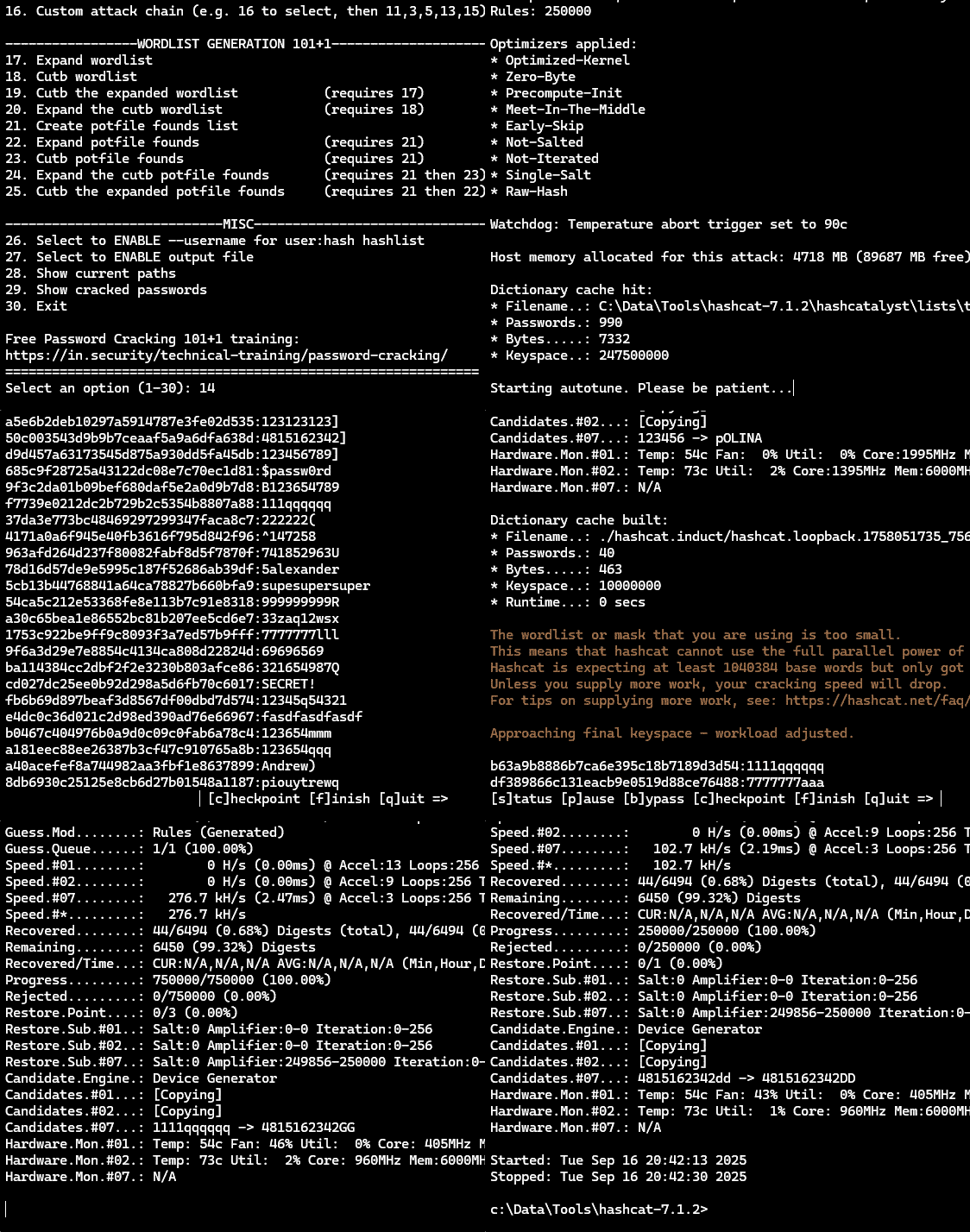
You can see this in effect below with option 14, where several passwords crack with random rules, so loopback kicks in and re-enters the founds into -g 250000 a second time, three further passwords crack, so those three founds are re-entered a third time and re-mangled, where a final single new password is found. Loopback runs a final time but no new passwords are found so it exhausts.
Wordlist augmentation
Hashcatalyst offers a variety of ways to generate new candidates based on your supplied wordlist or even your founds themselves.
-----------------WORDLIST GENERATION 101+1--------------------
17. Expand wordlist
18. Cutb wordlist
19. Cutb the expanded wordlist           (requires 17)
20. Expand the cutb wordlist             (requires 18)
21. Create potfile founds list
22. Expand potfile founds                (requires 21)
23. Cutb potfile founds                  (requires 21)
24. Expand the cutb potfile founds       (requires 21 then 23)
25. Cutb the expanded potfile founds     (requires 21 then 22)
We won’t cover all of these because several of them are actually similar actions, but we want to understand what expander and cutb are doing, so let’s dig in. There is also documentation about these two tools and many others from the hashcat-utils suite on the wiki.
Before we tackle those tools, let’s quickly look at option 21 as that’s a pre-requisite for several of the other options.
Option 21 simply extracts all the previously cracked passwords from your hashcat potfile and generates a wordlist out of them, hence they’ve been referred to as your “potfile founds”. In Hashcatalyst, the relevant line is below
./hashcat -m$hashcat_mode $hash_list --potfile-path=$potfile_path --show --outfile-format=2and is subsequently redirected to a new file. The –show switch can ordinarily be used to extract previously cracked hashes in a hash:plain format but as we’re not interested in the hashes, we can add –outfile-format=2 to extract the founds only. In particularly when cracking large numbers of hashes, using your existing founds as a base wordlist can often reap big rewards.
Expander
Expander is a neat little tool that allows you to generate all possible substrings of a password based on a minimum and maximum length.
It splits candidates then mutates and reconstructs them, allowing you to obtain variations of your candidates’ characters both in contiguous slices as well as by candidate shifting.
The source code on the hashcat-utils GitHub recently got updated from a default maximum character length of 4 to 7. Sometimes it’s beneficial to increase the LEN_MAX a little further and recompile depending on your use case, however be warned, that expanding large lists will take a lot of time and use a lot of disk space.

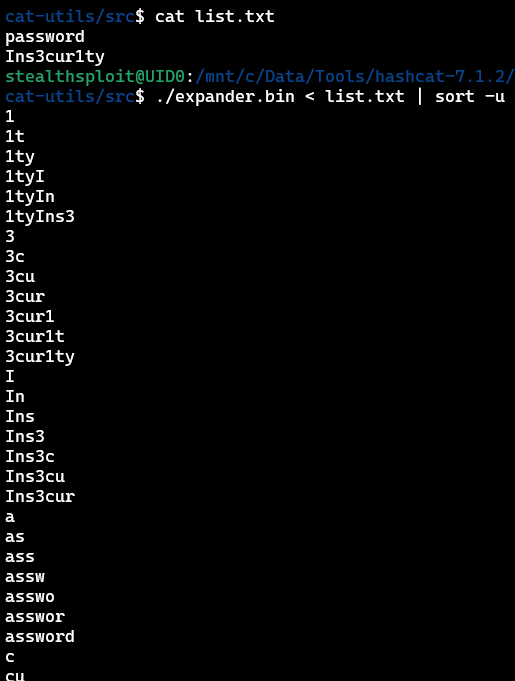
Using the defaults, you can see below what expander does to the candidates password and Ins3cur1ty.
The maximum length will be 7 characters and we can see both contiguous character runs, e.g. 3cur1t as well as candidate shifting, e.g. 1tyIns3, where the start of the candidate has been added to the end of it.
We’ve deduped the output as expander will produce duplicates (a better deduplication method is coming up) and edge cases aside, it’s generally good advice in any wordlist management to ensure duplicates are removed.
We’ll use option 17 as an example. The relevant code in Hashcatalyst is
"$hashcat_utils_path/expander.bin" < "$wordlist" | ./rlite.bin stdin -o "$wordlist_dir/expanded.wordlist.txt"which calls expander from the $hashcat_utils_path, expands your $wordlist, dedupes it and then stores the new file in $wordlist_dir.
Deduping is performed by rlite from CynoSure Prime which is included with Hashcatalyst and is a lightweight and fantastic tool for both efficient deduplication (as well as deduping against other lists) and maintaining ordering. For further reading about this and managing unique wordlists in general, I highly recommend this post from Royce Williams (TychoTithonus) which goes into great detail.
Cutb
Cutb is designed to slice candidates at specific lengths, which can be useful if you’re identifying patterns at the start, middle or end of a bunch of passwords which you want to leverage in further attacks.

In this example, we can see we’re slicing the first four characters of each candidate and then slicing the last four. You can also perform intermediate slicing if needed.
Hashcatalyst incrementally slices 10 characters forward and back from the start/end as shown below before further processing. Let’s look at option 18 as an example.
for i in {0..10}; do "$hashcat_utils_path/cutb.bin" 0 "$i" < "$wordlist" >> "$wordlist_dir/cutb.wordlist.forward.txt.tmp" ;done
for i in {0..10}; do "$hashcat_utils_path/cutb.bin" -"$i" < "$wordlist" >> "$wordlist_dir/cutb.wordlist.reverse.txt.tmp" ;done
The code above shows how $wordlist is sliced forwards and backwards in loops of up to 10 characters and the results are appended to some temporary files.
If you then look at the script, the code that follows combines and dedupes these temporary files, saving the output to cutb.wordlist.combined.txt (or cutb.potfile.combined.txt if option 23 were selected to use the potfile instead). The individual forwards/backwards outputs are also deduped and saved if needed later.
The above examples were targeting the defined wordlist, but the remaining Hashcatalyst options we haven’t covered are fairly self-explanatory at this point. We can expand or cutb our potfile founds and we can even run expander over an existing cutb file or cutb over an existing expanded file.
Wrap up
Combining these wordlist generation methods with varying attack types can often give you an extra edge. Everything we’ve discussed can be done manually and we highly encourage you to learn manually too, as understanding leads to informed decisions and increased crack rates.
Many public wordlists exist but finding new and creative ways to generate new candidates is often a gateway to higher average crack rates, which leads to finding more patterns, cracking more passwords, and quite often, more domain admins.
Check out our free Password Cracking 101+1 training with hands-on exercises if you want to level up. After levelling up, check out Hashcracky which is a free password cracking CTF. They have annual competitive and monthly themed casual events, perfect for keeping your skills sharp.
Happy cracking!